Large language models in HR: what a single model can and can't handle
What large language models can handle in HR, where they fall short, and what to evaluate before choosing an AI solution.

An employee asks your company's AI (artificial intelligence) assistant: "I am unwell and can't come to work. Can I work from home?"
The assistant checks the HR handbook and answers. Simple enough.
But what if the employee qualifies for medical leave or workplace accommodations? What if they've already used their available leave? Missing these details could lead to incorrect guidance, compliance risks, or denied benefits.
That’s the question IT and HR tech teams keep getting asked: is connecting a general-purpose large language model (LLM) to HR data good enough?
This guide explores what large language models can handle in HR, where they fall short, and what to evaluate before choosing an AI solution.
What can large language models do in HR today?
Large language models (LLMs) are particularly useful for HR tasks that involve understanding, summarizing, or generating text. According to SHRM's 2025 Talent Trends report, 43% of organizations use AI to support HR tasks, up from 26% in 2024.
General models do well at four kinds of work:
- Drafting. Job descriptions, offer letters, policy updates, and manager talking points come together in minutes, ready for HR to review and edit.
- Summarization. Long policy documents, survey comments, performance evaluations, and exit interview notes condense into themes HR professionals can act on.
- Simple policy Q&A. Tier-zero questions with one answer for everyone, like when open enrollment starts or where to find the holiday calendar, are easy wins for chatbots connected to approved sources.
- Employee-facing conversation. A model can explain a benefit in plain language, in many languages, at 2 a.m.
These uses also extend to talent acquisition, like drafting outreach and summarizing resume screening notes, and talent management.
These match most of the common AI use cases in HR, and for good reason: the work is language in and language out. The limits show up when the answer depends on facts the model can't see.
Where a single model falls short on HR work
An LLM might give an employee a perfectly worded answer and still get the underlying HR decision wrong.
The National Institute of Standards and Technology (NIST) calls this risk confabulation: when generative AI confidently presents false or inaccurate information.
In HR, the problem goes beyond hallucinated facts. Even an answer drawn from a real company policy can be wrong if the model overlooks who the employee is, which rules apply, or what's already happened in their case. Algorithmic bias is another concern when systems treat similar employees differently without good reason.
Here are four areas where a single model can fall short.
Policy and jurisdiction
Consider an employee asking, "How many sick days do I get?"
The answer may depend on location, employment status, tenure, and applicable company policies. An employee working in a city with its own paid sick leave requirements may have different entitlements from a colleague in another location.
An LLM connected only to the employee handbook might return the company's standard sick leave policy without accounting for those differences.
For IT and HR teams, the challenge is making sure the system identifies the employee, checks the relevant policies and legal requirements, and applies the right rules before answering.
Facts that change the process
Some facts change the whole path a case should take. Leave is the clearest example.
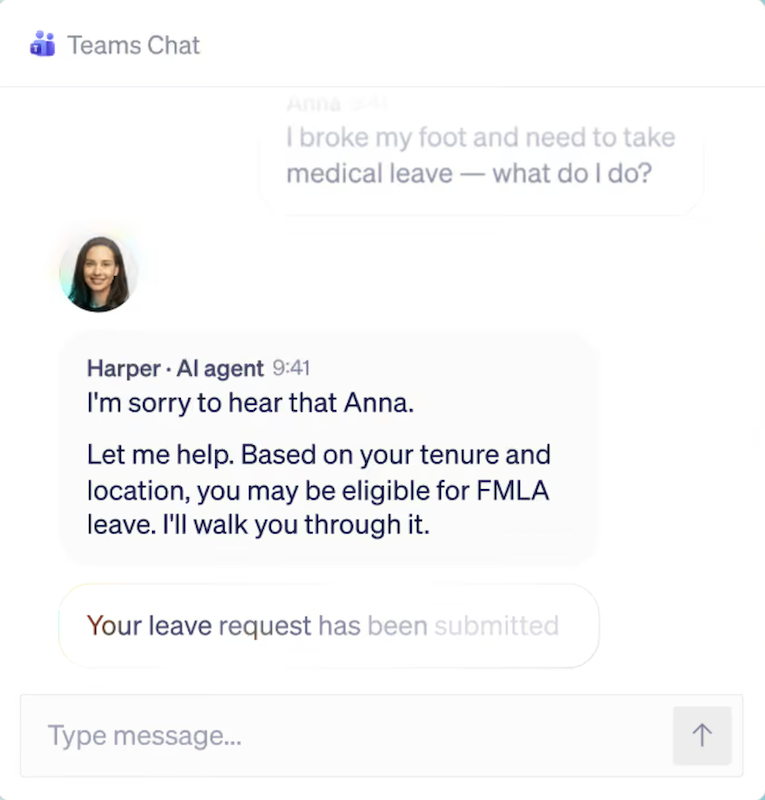
An employee writes, "I hurt my foot at work and need two weeks off." A single model recognizes a leave request and moves in a straight line: injury, leave request, time off.
An experienced HR professional pauses to verify the facts. For example, has the employee used FMLA leave before? Are they eligible for more? Does workers' compensation apply?
Under the Family and Medical Leave Act (FMLA), eligible employees can take up to 12 workweeks of job-protected leave in a 12-month period. How much remains depends on previous leave use and the employer's method of calculating that period.
Before responding, HR needs to establish:
- Whether the employee meets FMLA eligibility requirements.
- How much FMLA leave they've already used.
- Whether other federal, state, or company leave provisions apply.
Each answer can change how the case should be handled. That’s the problem Wisq, the AI platform for HR, is solving with Harper, its AI HR teammate.
For example, if an employee requests six weeks of medical leave but has already used eight weeks of FMLA leave, Harper can check their leave history and flag that only four weeks of FMLA leave may remain. She can also gather the applicable policies and prepare the details for HR to review, so the team can assess other leave options without starting from scratch.
No memory of the employee or past cases
A single model starts every conversation cold. It doesn't know the employee asked about the same leave last week, that their manager already raised a performance concern, or how your team handled the last three similar requests.
Employees repeat themselves, answers drift from one conversation to the next, and HR loses the thread that makes a case defensible. Consistency in HR depends on precedent, and a model with no record of past cases has nothing to apply.
Why retrieval alone misses things in HR data
Retrieval-augmented generation (RAG) gives a model access to your documents by pulling the most relevant passages into the prompt. It works well for short lookups.
HR data exposes its limits quickly, in three ways:
- Chunking breaks structure. RAG systems split documents into small chunks. In a performance review, the employee's name and reporting line can end up separated from the feedback at the end, so the model loses track of who the feedback is about.
- The top matches can leave gaps. Retrieval returns a handful of best-matching passages. In Wisq's own testing, a standard retrieval assistant asked to list the goals in a performance review missed most of the eight goals. The same model listed all eight when it had the full file.
- A topic match can miss eligibility. An employee asking, "How much vacation can I take?" needs more than a passage about PTO. The answer may require their leave balance, employment status, location, and applicable accrual rules.
What HR needs beyond a single model
HR needs more than a language model that can read policies and answer questions. Even well-designed HR processes need accurate employee data. It also needs a system that can check employee records, apply the right policies, remember previous interactions, and keep track of actions taken.
This is the idea behind agentic AI in HR, where an AI agent plans and acts across the steps of a case. That matters when HR workflows involve more than answering a question.
At Wisq, the HR Reasoning Engine powers Harper and brings together these capabilities:
- Reasoning for multi-step cases: Some HR requests involve several people, systems, and approvals. For example, a promotion request may require checking eligibility, reviewing the manager's justification, and gathering details for HR approval.
- Policy and compliance logic: Answers account for company policies and the employee's location. For example, an employee in California may have different leave entitlements than someone in Texas.
- Long-term case memory: If an employee follows up on a leave request two weeks later, Harper can refer to the earlier conversation and case details instead of making them explain everything again.
- Guardrails on what Harper can and can't say: Harper follows rules around confidential information, protected classes, and jurisdiction-specific requirements. Cases that need human oversight are passed to HR, rather than decided by the model alone.
- An audit record: HR can see what Harper did, which information and policies she used, and why a case was escalated. This is useful when reviewing a complaint or checking how a decision was reached.
- Cross-system action: Harper works across HRIS, ticketing, and other HR systems to retrieve information and update records where permitted, so HR operations teams don’t have to move between several platforms to complete a request.
How HR reasoning works in practice
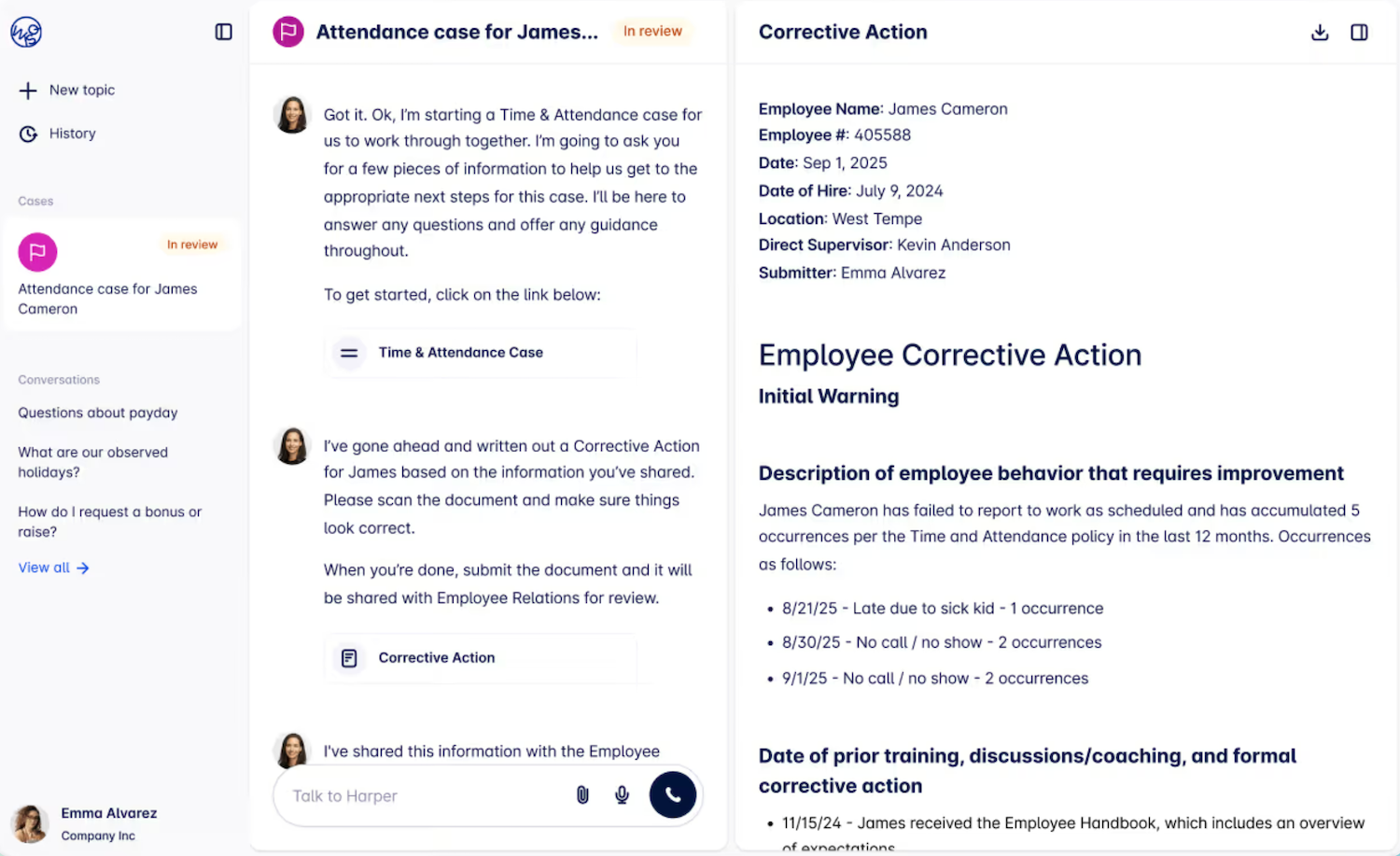
When an employee submits a request, Harper first identifies what they're asking and what information is missing. She then reviews employee records, past conversations, and company policies before deciding how to handle the request.
For example, if an employee requests medical leave, Harper can check their tenure, leave history, and applicable policies. Depending on what she finds, she might ask for more information, guide the employee through the leave process, or involve HR if the case needs human judgment.
HR doesn't have to piece together the employee's history or figure out which policy applies before responding. That plan-then-act pattern is what makes an AI HR teammate useful on real cases.
Domain-specific models inside the engine
The HR Reasoning Engine uses a family of fine-tuned HR language models (HRLMs). These AI models are further trained on HR-specific information and tasks, so they can better understand questions about employee benefits, leave policies, performance issues, and compliance requirements.
However, the models don't handle everything themselves. The reasoning, policy, memory, and audit components around them help Harper determine which rules apply, what information is missing, and when HR needs to step in.
How to evaluate an LLM approach for HR
Before choosing an approach, IT and HR leaders should agree on a short list of questions. These help HR managers compare options without getting lost in HR technology jargon.
They apply whether you're scoping an internal build, a feature from your Human Capital Management (HCM) vendor, or one of the AI tools built for HR teams.
- How accurate is it when applied to your hardest HR scenarios? Test it on real cases, such as a multi-state leave request or a thin promotion justification, and score the results against your own criteria. Ask how drift gets caught when the underlying model changes.
- How does it handle employee data and access? Find out what data the model can see, how role-based permissions are enforced, where data is stored, and whether your data trains shared models.
- Who maintains it as policies change? Someone has to update the knowledge base and guardrails when a state law or handbook changes, and someone has to notice when answers drift.
- Does it work inside one system or across several? HCM-native agents, such as Workday's, handle quick automation using the data inside that HCM well, and the HCM remains your system of record. HR cases that touch ticketing, benefits providers, or policy libraries reach beyond any single system.
- How does it decide when to hand off, and can you see why? Ask whether every action leaves a record HR and IT can review. This is a basic test of responsible AI in employee-facing systems.
These questions also mark the line between a model that answers and the AI HR agents that carry a case through to resolution.
What decides whether HR can rely on the answer
A reliable HR answer depends on more than the language model. The system also needs to check the employee's circumstances, apply the right policies, account for previous cases, and keep a record of how the request was handled.
Before choosing AI in human resources, test the AI HR platform against a few complex HR cases your team has already resolved. Does it find the right information? Does it recognize when something is missing? And does it know when to involve HR instead of deciding on its own?
If you're comparing a general-purpose LLM with an HR-specific solution, a Harper demo shows how the HR Reasoning Engine handles policy, jurisdiction, case history, and the audit trail on real cases. For IT teams, the Wisq for IT overview covers integrations, permissions, and observability.
FAQs about large language models in HR
Can ChatGPT or Copilot be used for HR work?
Yes. ChatGPT and Copilot work well for drafting, summarizing, and general HR questions. However, they don't automatically have access to employee records, leave balances, or company-specific compliance rules. Without the right integrations and safeguards, they're less suited to handling individual employee cases.
What is a domain-specific language model for HR?
It's a language model fine-tuned on HR-specific information, such as policies, compliance rules, and case handling. However, it still needs employee context, case memory, and audit records to handle complex requests. Wisq's HR Reasoning Engine combines HR-specific models with these additional capabilities.
Are large language models safe to use with employee data?
They can be, depending on how they're deployed. Ask what data the model can access, how permissions are enforced, where data is stored, whether your data trains shared models, and whether every response is logged. If your workforce includes people in the EU, ask how the system supports GDPR obligations. NIST's Generative AI Profile names data privacy as a core risk to govern. Bring IT and legal into these questions before rollout.